
Bring more guidance to Eye PD.
Distance and near PD workflows for compatible devices, with camera processing on the device.
Explore the yearly plan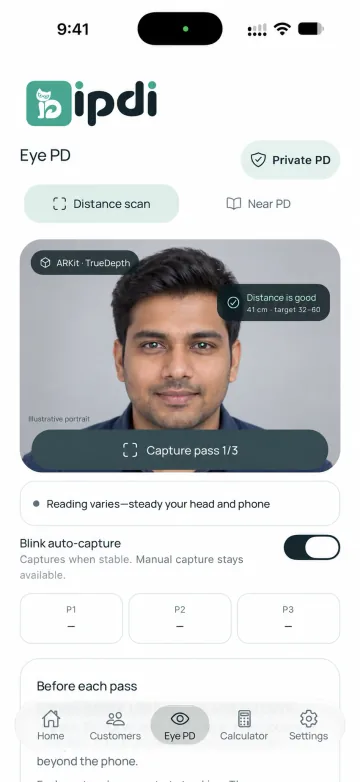
Choose the right workflow.
Open Distance scan or Near PD. Follow the setup and distance guidance shown in the app.
Capture with guidance.
The shown interface includes three capture passes, stability feedback and blink auto-capture controls.
Camera processing stays on the device.
Camera photos, facial data and depth data for Eye PD are processed locally and are not uploaded to a server. Customer cloud records are a separate workflow.
Check your exact device.
ARKit / TrueDepth capture requires compatible hardware. Confirm release and hardware support with the team; this website does not make a certification or accuracy claim.
What does PD mean here?
PD means pupillary distance. IPDI shows separate distance-capture and near-PD workflows for optical work.
Does automatic Eye PD scanning work on every phone?
No universal device support is claimed. The shown ARKit / TrueDepth distance workflow requires compatible hardware and release support.
Does this page provide a medical or accuracy certification?
No. Check device support, measurement suitability and any validation directly with the IPDI team before operational use.
Make room for
a clearer working day.
Tell us about your optical shop.
We’ll help you explore the upcoming release.